
When to Use Power Strips vs Surge Protectors

I’ve lost count of how many desks I’ve seen with the wrong bar doing the job. The truth is simple: a power strip1 adds outlets; a surge protector2 protects electronics. Sometimes you need both—in one device. Here’s how I decide in real life.
Power Strip vs Surge Protector
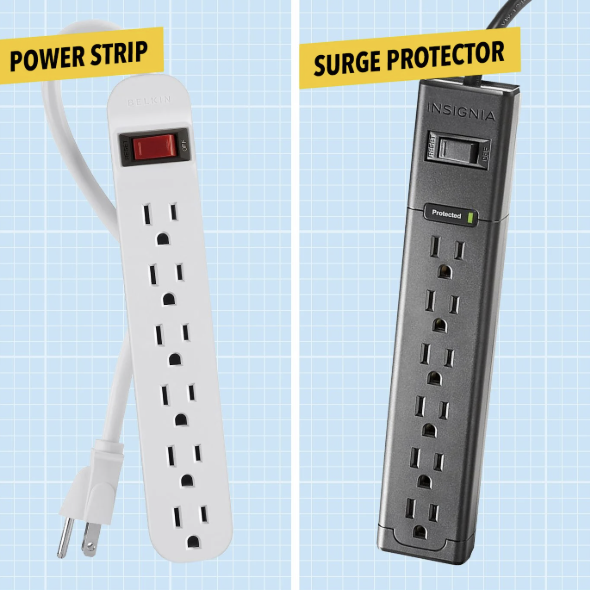
In one sentence:
- Power strip = outlet expander (usually with an overload switch).
- Surge protector = outlet expander plus a surge-absorbing stage (MOVs) to clamp voltage spikes.
What’s inside a surge protector2?
- MOVs (Metal Oxide Varistors)3 that absorb spikes,
- a thermal disconnect4 so they fail safe,
- a “Protected” light to show the surge stage is still alive.
Compliance quick check
- EU/UK: look for CE/UKCA5 and RoHS.
- US/CA: look for UL/ETL (and SPD listing for surge models).
If it’s smart/Wi-Fi, you’ll also see EMC/FCC/RED.
Fast comparison
| Feature | Power Strip | Surge Protector (Power Strip + SPD) |
|---|---|---|
| Adds more outlets | ✅ | ✅ |
| Overload breaker | Usually ✅ | ✅ |
| Surge absorption | ❌ | ✅ (joule rating6 shown) |
| “Protected” indicator | ❌ | ✅ |
| Best for | Low-risk loads | Electronics worth saving |
When to Use a Power Strip
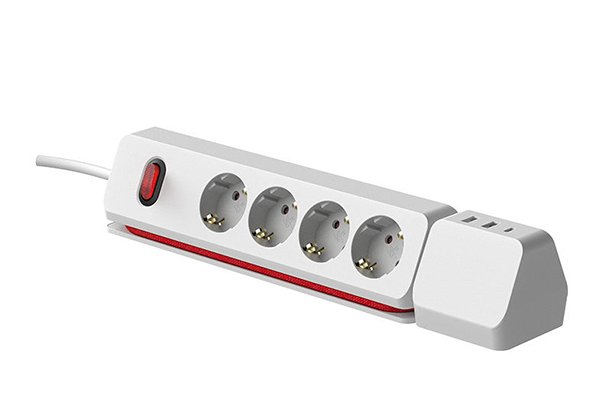
Use a plain power strip1 when you only need more sockets and the gear isn’t surge-sensitive.
Good examples
- Desk lamp, phone charger, fan, printer in a low-risk building.
- Workshop tools with their own robust power supplies (non-electronic motors).
- Temporary event setups where a breaker and tidy layout matter most.
What I look for
- Resettable overload switch (safety first).
- Wide-spaced outlets for bulky plugs.
- Flat/angled wall plug and the right cord length (1.8–2.5 m).
- Real markings: CE/UKCA5 or UL/ETL, RoHS.
What I avoid
- Daisy-chaining (strip-into-strip).
- High-watt devices (heaters, kettles, hair dryers) — wall outlet only.
When to Use a Surge Protector
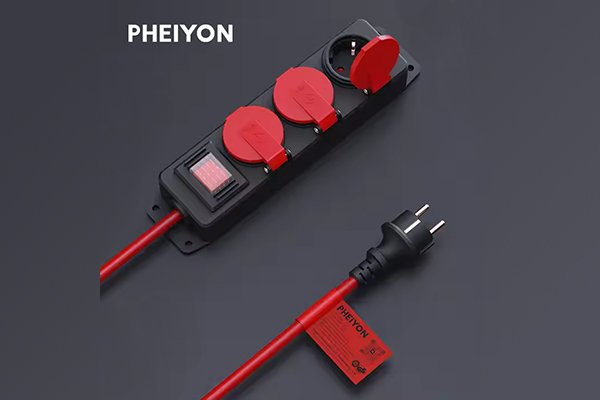
Choose a surge protector2 when a spike could ruin your day—or your data.
Use cases I never compromise on
- Gaming/Creator PC + monitors, NAS, external SSDs.
- Home office: laptop/monitor/docking station, router, VoIP.
- AV setups: TV, console, soundbar, streamer.
- Areas with unstable power or frequent storms.
How I size protection
- Desks/TV corners: ≥1,000 J.
- Premium rigs or sketchy mains: 1,500–3,000 J.
- Prefer models with thermal MOV disconnect and a “Protected” LED.
Bonus features worth paying for
- EMI/RFI filtering7 (helps with hiss or flicker).
- USB-C PD8 (30–100 W) with a clear power map (per-port vs shared).
Choosing the Right Option

Start with the risk, not the number of sockets.
1) What am I plugging in?
- If it’s electronics you care about → Surge protector.
- If it’s simple, low-risk loads → Power strip.
2) How much power do I draw?
- Read labels and add watts.
- Stay 20–30% below the strip’s rating (EU: 10–13 A @ 230 V ≈ 2,300–3,000 W; US/CA: 15 A @ 120 V ≈ 1,800 W).
3) Do I need charging on the bar?
4) Check the paperwork
- Region-correct marks: CE/UKCA5 (EU/UK) or UL/ETL (US/CA) + RoHS.
- Clear model number, rating, and a visible Protected light on surge models.
Mini decision table
| Situation | Best Choice | Notes |
|---|---|---|
| Laptop + monitor + router | Surge protector | 1,000–1,500 J, USB-C PD8 helpful |
| Gaming PC + 2 monitors | Surge protector | 1,500–3,000 J, EMI/RFI filter |
| Dorm desk (low-risk loads) | Power strip | Overload switch, compact body |
| TV + console + soundbar | Surge protector | 1,000–2,000 J, long cord |
| Heater or kettle | No strip | Wall outlet only |
Final Tips I Live By
- Count watts, not sockets.
- No daisy-chains, ever.
- Keep the bar ventilated; don’t hide it under rugs.
- If the “Protected” light goes out, replace the surge protector2.
- For smart models, make sure EMC/FCC/RED compliance is listed.
Looking for OEM/ODM Options?
At Howdy (how-dy.com) we build power strip1s and surge-protected bars with overload breaker9s, thermal MOV protection, USB-C PD8, wide-spaced outlets, and region-ready compliance (CE/UKCA5, UL/ETL, RoHS). If you share your market, cord length, USB-C wattage, and target joule rating6, I’ll spec a safe, tidy, and cost-effective model for you—low MOQ pilots included.
Bottom line:
If you care about the device, choose surge protection. If you just need more outlets for low-risk loads, a power strip1 is fine. Pick the bar that matches your risk, load, and certifications, and the rest of your setup gets easy.
-
Learn the key differences to ensure you’re using the right device for your needs. ↩ ↩ ↩ ↩
-
Understanding surge protectors is crucial for protecting your electronics from voltage spikes. ↩ ↩ ↩ ↩
-
Discover how MOVs function to absorb voltage spikes and protect your devices. ↩
-
Find out how thermal disconnects enhance safety in surge protectors. ↩
-
Understanding these compliance marks ensures you’re using safe and certified products. ↩ ↩ ↩ ↩
-
Learn about joule ratings to select the right surge protector for your electronics. ↩ ↩
-
Discover how EMI/RFI filtering can improve the performance of your electronics. ↩
-
Explore the benefits of USB-C PD for efficient charging of your devices. ↩ ↩ ↩ ↩
-
Understanding overload breakers can help you choose safer power solutions. ↩