
Power Strips for Gamers: Essential Features for High-Performance Setups
I’ve learned the hard way that “any old strip” isn’t enough for a gaming battlestation. High loads, sensitive GPUs, capture gear, and fast chargers need a bar that’s safe, quiet (electrically), and thoughtfully laid out. Here’s how I choose—and what I recommend to fellow gamers.
1. Key Features Gamers Need in a Power Strip

Safety & Protection
- Surge protection (joules stated): Aim for ≥1,000 J for mainstream builds; 2,000–3,000 J if you’re protecting a pricey PC + monitor stack.
- Overload protection: A resettable breaker that trips cleanly instead of cooking silently.
- Thermal safeguards: MOV + thermal disconnect; flame-retardant housing1 (e.g., UL94 V-0 plastic).
- Ground/Protection lights: Clear status LEDs so I can see, at a glance, that surge and earth are present.
Clean Power for Sensitive Gear
- EMI/RFI filtering2: Helps reduce coil whine or audio hiss in DAC/amps and powered speakers.
- Low clamping voltage / fast response: Better suppression of spikes reaching your PSU.
Layout & Usability
- Wide-spaced outlets: Leave room for chunky bricks (router, DAC, VR base station).
- Angled/flat wall plug & proper cord length: 1.8–2.5 m is the sweet spot for most rooms.
- Mounting options: Under-desk keyholes or brackets keep the floor clear.
- Individually switched outlets (optional): Handy for cutting LED strips or external drives.
Charging & I/O
- USB-C PD (65–100 W shared)3: Fast-charge laptops, controllers, headsets, and phones without extra bricks.
- USB power map transparency: I want to see per-port vs shared wattage, not marketing fluff.
Compliance & Build
- Region-appropriate plug/socket type with CE/UKCA (EU/UK) or UL/ETL (US/CA) and RoHS materials.
- Solid copper conductors in the cord; strain relief that doesn’t split after a few moves.
2. How to Choose the Right Power Strip for Your Gaming Setup

Match the strip to your load (rough guide)
| Setup Type | What’s Plugged In | Recommended Spec |
|---|---|---|
| Console + TV | Console, TV/monitor, soundbar, router | 6 outlets, ≥1,000 J surge, EMI/RFI filter, 1.8 m cord |
| Mid-range PC | 600–850 W PSU, 1–2 monitors, speakers, charger | 8 outlets, 1,500–2,000 J, wide spacing, USB-C PD 65 W |
| Streaming/Creator | High-draw PC, dual/triple monitors, lights, DAC/capture | 10 outlets, 2,000–3,000 J, EMI/RFI, long cord (2.5 m), mountable |
| LAN/Portable | Mini-ITX or laptop + monitor | Compact 4–6 outlets, ≥1,000 J, travel-friendly right-angle plug |
Good / Better / Best quick pick
| Tier | Surge (J) | Outlets | USB-C PD | Extras |
|---|---|---|---|---|
| Good | 1,000 | 6 | 1× 45–65 W (shared) | Flat plug, status LEDs |
| Better | 1,500–2,000 | 8 | 2× (65–100 W shared) | EMI/RFI filter, wide spacing, keyholes |
| Best | 2,000–3,000 | 10 | 2× (up to 100 W) + 1× USB-A | Individually switched groups, cable management clips4 |
Two things I always check
- Label honesty: Printed ratings for amps, watts, and surge joules; clear USB power map.
- Fit & finish: Firm socket grip, no wobble on the main switch, cord jacket that doesn’t feel brittle.
3. HOWDY Gaming Power Strips: Designed for High-Performance Setups
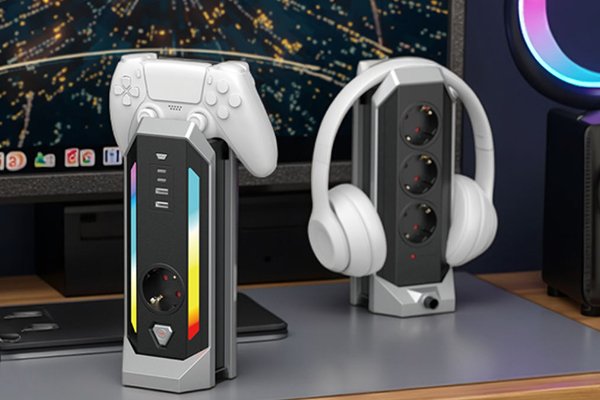
Built with gamer layouts and retailer compliance in mind.
- Protection first: Overload breaker + MOV with thermal disconnect; surge options spanning ~1,000–3,000 J (market dependent).
- Noise-aware design: EMI/RFI filtering2 to help keep audio stacks clean and displays stable.
- Gamer-friendly spacing: Wide outlets for bricks, side-oriented sockets on select models, and under-desk mounting points.
- USB-C PD done right: Configurations up to 65–100 W shared, with a published per-port vs shared power map.
- Build & standards: Flame-retardant housings (target UL94 V-0), region-specific cords and plugs, with CE/UKCA or UL/ETL compliance options for target markets; RoHS materials.
- Custom/OEM options: Cord length, colourways, indicator styling, and packaging tailored for e-commerce or retail aisles—plus low-MOQ pilot runs for channel testing.
If you need a spec matched to your platform (EU/UK/US), tell me your number of devices, cord length, and whether you want USB-C PD—I’ll map the exact configuration.
4. Tips for Safely Using Power Strips in Gaming Setups

- No daisy-chains: Never plug a strip into another strip or into a long extension lead.
- Mind the total load: Add up the watts/amps on your PSU, monitors, and extras; stay under the strip’s rating with headroom.
- Ventilation matters: Don’t bury the strip behind a radiator or under a rug. Leave space around bricks.
- High-watt heaters = wall only: Space heaters, kettles, hairdryers—keep them off strips.
- Replace tired surge strips: MOVs wear out. If the protection LED goes dark (or the unit is several years old under heavy use), replace it.
- Cable hygiene: Use velcro ties and route signal cables away from mains cords to reduce interference.
- UPS vs Surge5: If you suffer brownouts or frequent cuts, consider a UPS for the PC and use the surge strip for peripherals.
Conclusion
A great gaming power strip is safe, quiet, and practical—with room for chunky bricks and honest charging specs. Start with proper surge/overload protection6, add EMI/RFI filtering2 if you run audio, and choose layouts that match your rig. Do that, and you’ll protect your gear, tidy your setup, and spend more time pushing frames—not chasing gremlins in your power.
-
Learn about the safety benefits of flame-retardant materials in power strips to protect your gear. ↩
-
Learn how EMI/RFI filtering can enhance your audio experience, making your gaming sessions more immersive. ↩ ↩ ↩
-
Discover the advantages of USB-C PD for fast charging your devices without cluttering your setup. ↩
-
Discover how cable management clips can help keep your gaming area organized and free of clutter. ↩
-
Understand the differences between UPS and surge protectors to make informed decisions for your gaming setup. ↩
-
Find out why overload protection is crucial for preventing damage to your gaming equipment. ↩