
Adapter vs Power Strip: What’s the Difference and When to Use Each?

If you’ve ever stared at a plug that doesn’t fit—or a desk with too few sockets—you’ve met this choice: adapter or power strip? They solve different problems. Here’s a clear, practical guide to what each one does, how they differ, and when to use which.
What Is an Adapter? Definition, Types, and Common Uses

Simple idea: An adapter changes how you connect, not the electricity itself (unless it’s a converter).
Main types
-
Plug (travel) adapter
Changes the plug shape so your device can fit a foreign wall socket (e.g., UK → EU).
It does not change voltage or frequency. -
Voltage converter / transformer
Steps 120 V ↔ 230 V for devices that aren’t dual-voltage. Often heavier, with a rated watt limit.
Use only when your device is not 100–240 V. -
AC-DC power adapter / USB charger1
Converts AC mains to low-voltage DC (e.g., 5–20 V) via USB-A/USB-C (PD/PPS). This is a power supply, not just a shape changer.
Good for
- Travel (plug compatibility)
- Low-to-moderate power electronics (phones, tablets, cameras)
- Occasional use with a proper converter for single-voltage appliances
Watch outs
- Check the device’s rating plate for “100–240 V, 50/60 Hz”. If you don’t see this, you may need a converter, not just a plug adapter.
- Choose certified products (e.g., CE/UKCA in EU/UK; UL/ETL in US/Canada).
What Is a Power Strip? Key Features and Applications
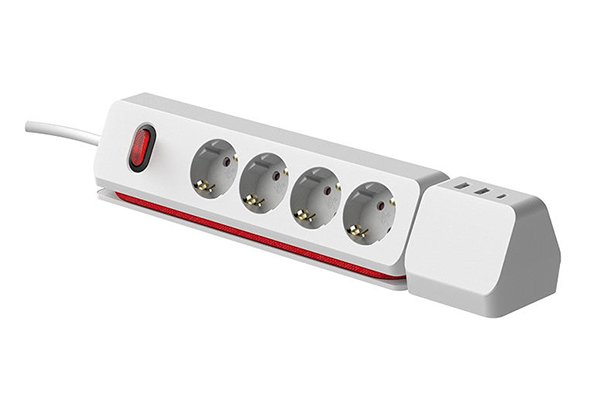
A power strip expands the number of available outlets from a single socket. Many add safety and charging features.
Common features
- Multiple AC outlets (often wide-spaced for bulky plugs)
- Overload protection (resettable breaker)
- Surge protection (look for a joule rating2) — optional; not every strip has it
- USB-C/USB-A charging (USB-C PD3 30–100 W on newer models)
- Master switch, indicator lights, child-safety shutters4, right-angle or flat plug, cord length options
Good for
- Home office, entertainment setups, workbenches
- Neat cable management and centralised switching
- Adding USB charging without extra bricks
Watch outs
- Don’t exceed the strip’s ampere/watt rating.
- Avoid daisy-chaining5 (strip-into-strip).
- High-watt heaters or big appliances should plug directly into the wall.
Adapter vs Power Strip: Main Differences in Function and Safety

| Aspect | Adapter (Plug / Converter) | Power Strip |
|---|---|---|
| Primary purpose | Fit: match plug shape; optionally convert voltage | Expand: add more sockets (and sometimes surge/USB) |
| Voltage handling | Plug adapter: no change; Converter: yes | No change to mains voltage (unless integrated power supply for USB) |
| Typical loads | One device | Several devices at once |
| Safety features | Basic (FOD in chargers, fuse in converters) | Overload breaker, surge protection6 (if present), thermal/child shutters |
| Best use case | Travel, single device | Desks, AV setups, small office/home office |
| Key risk | Using only a plug adapter on a non-dual-voltage device | Overloading or daisy-chaining5 power strips |
Important: A power strip is not automatically a surge protector. If you need surge protection6, pick a strip with a stated joule rating2 (and relevant certifications).
When to Use an Adapter and When to Choose a Power Strip

Choose an adapter when…
- You’re travelling and only need to change the plug shape.
- Your device is dual-voltage (100–240 V) and you only need physical compatibility.
- Your device is single-voltage and you have the correct voltage converter/transformer.
Choose a power strip when…
- You need more outlets in one place (home office/TV unit/workbench).
- You want surge protection6 for electronics (look for joules and indicator lights).
- You want USB-C PD3 charging built in to tidy the desk.
Avoid both (use the wall outlet directly) when…
- You’re powering space heaters, portable AC units, microwave ovens, kettles, hair dryers, or other high-watt appliances. These should go directly into a wall socket rated for the load.
Quick Decision Flow
1) Travelling?
- Device label says 100–240 V → Plug adapter only.
- Single-voltage device → Voltage converter (sized for watts) + appropriate plug adapter.
2) Needing more sockets at a desk?
- Use a power strip with overload protection7; add surge if protecting electronics.
3) Charging laptops/phones cleanly?
Safety & Compliance Tips (EU/UK/US)
- Look for CE/UKCA (EU/UK) or UL/ETL (US/Canada) and RoHS material compliance.
- Match the strip to local mains (e.g., 230 V~ 50 Hz EU/UK; 120 V~ 60 Hz US).
- Don’t hide strips under rugs or cover with fabric; allow ventilation.
- Replace ageing surge strips every few years (MOVs wear out); indicator lights help.
- Never daisy-chain strips or run them from an extension cord.
Conclusion
- Adapter = make a plug fit (and sometimes convert voltage).
- Power strip = add outlets (and optionally surge protection6 and USB charging).
Pick the one that matches your need—fit vs expand—and always check ratings and certifications. That way your devices stay powered, safe, and happy wherever you plug in.
-
Explore the role of AC-DC power adapters in powering your devices efficiently. ↩
-
Understanding joule ratings can help you choose the right surge protector for your needs. ↩ ↩
-
Learn about USB-C PD technology to enhance your charging experience. ↩ ↩ ↩
-
Explore how child-safety shutters can protect children from electrical accidents. ↩
-
Avoiding daisy-chaining can prevent electrical hazards and ensure safety. ↩ ↩
-
Find out why surge protection is crucial for protecting your devices from power spikes. ↩ ↩ ↩ ↩
-
Discover how overload protection can safeguard your electronics from damage. ↩