
The Rise of USB-C Power Strips: Faster Charging for All Devices
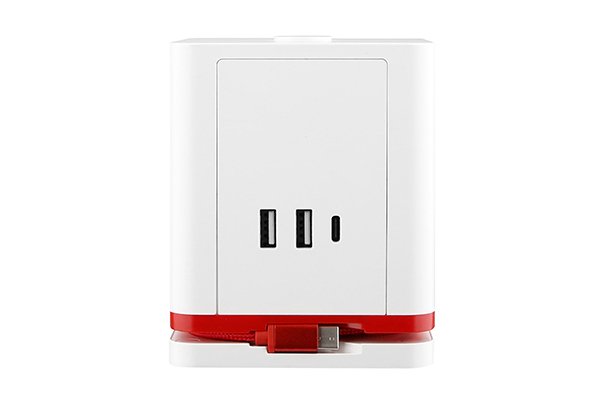
USB-C isn’t a “new cable” anymore—it’s the charging language most of our devices speak. That’s why power strips are evolving from simple outlets with a couple of USB-A ports to USB-C + AC hybrids1 that charge laptops, tablets, and phones—fast—without the bricks.
Why USB-C Power Strips Are Replacing Traditional USB-A Models
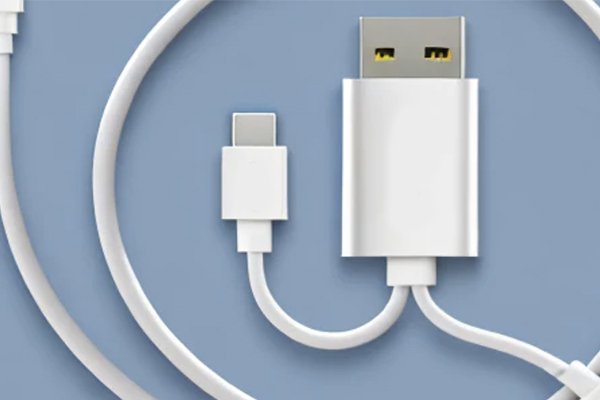
I see three big reasons:
- More power, less clutter. USB-C Power Delivery (PD)2 pushes 30–140 W over a single port. That’s laptop territory. Goodbye, bulky adapters.
- One connector for everything. Phones, tablets, headphones, e-readers—even many cameras—now ship with USB-C, so the strip becomes your universal dock.
- Smarter, safer charging. PD negotiates voltage/current automatically (and PPS for fine-tuned phone fast-charge), reducing heat and cable stress.
- Ready for regulations and standards. Markets increasingly favor common charging interfaces and tighter safety rules (think CE/UKCA3 in Europe, UL/ETL4 and FCC in the U.S., RoHS for materials).
Bottom line: USB-A is fine for low-power accessories, but USB-C handles the heavy lifting—and that’s where users are headed.
Key Benefits of USB-C Charging for Laptops, Phones, and Tablets
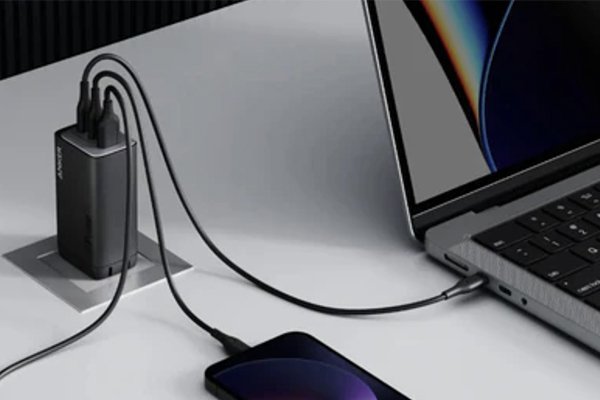
Fewer adapters, faster desks. I love plugging a laptop straight into the strip and keeping the surface clean.
| Device Type | Recommended PD Power | What You Gain |
|---|---|---|
| Ultrabooks / Office Laptops | 65–100 W | Full-speed charging while working, fewer “battery throttles” |
| High-performance Laptops | 100–140 W | Stable charge during heavy loads (graphics, CAD, dev builds) |
| Tablets / iPads | 30–45 W | Rapid top-ups between meetings |
| Phones (PD/PPS) | 20–30 W | Fast, cooler charging with better battery health |
| Earbuds / Watches | 5–15 W | Gentle trickle without extra bricks |
Bonus wins
- Load balancing: Multi-port strips with dynamic power sharing allocate watts where they’re needed.
- Efficiency: GaN power stages5 improve efficiency and shrink size, reducing heat and stand-by draw.
- Travel-light setups: One strip, one cable per device. That’s it.
Top Features to Look for in a USB-C Power Strip

Think safety first, then speed and convenience.
Safety & Compliance
- Certifications: CE/UKCA3 (EU/UK), UL/ETL4 (US), FCC (EMI), RoHS (materials).
- Protection stack: overload reset switch, thermal cut-off, surge protection (check joule rating6), child shutters, flame-retardant housing (e.g., UL94 V-0).
Charging Performance
- Per-port PD rating: 30 W / 45 W / 65 W / 100–140 W. Match to your laptop.
- Power map transparency: Clear label showing per-port and shared wattage.
- PPS support7: Better fast-charging for many Android phones.
- Cable quality: If bundled, look for E-marked USB-C cables for 100–240 W.
Design & Usability
- Socket spacing: Wide outlets so big plugs don’t block neighbors.
- Flat/angled wall plug and the right cord length (don’t coil excess under rugs).
- Mounting options: Under-desk brackets, keyholes, or adhesive channels for cable management.
- Low standby power: Aim for <0.5 W idle consumption.
Smart (optional but handy)
- Per-outlet control & scheduling, energy reports, and reliable local automations.
- Matter/Thread or solid Wi-Fi, with clear firmware update policy.
Quick chooser
| Use Case | What I’d Pick |
|---|---|
| Home office (laptop + monitor + phone) | Surge-protected strip with 65–100 W PD, 2×USB-C + 1×USB-A, wide spacing |
| Creative / dev workstation | High-joule surge, EMI/RFI filtering, 100–140 W PD, long cord, metal mounting |
| Meeting rooms | Multiple 65–100 W PD ports, cord management, overload reset, clear labeling |
| Travel | Compact 3-AC outlets + 2×USB-C PD (65–100 W shared), universal 100–240 V input, fused plug |
Market Outlook: The Growing Demand for USB-C Power Solutions
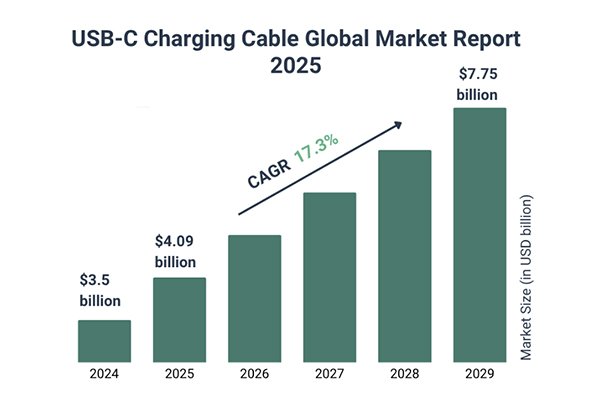
Here’s where it’s heading over the next few years:
- USB-C everywhere. As more laptops and tablets ditch barrel plugs, PD power strips replace separate chargers at the desk and in meeting spaces.
- Higher-power PD gets common. 100–140 W PD on strips moves from premium to mainstream; GaN keeps sizes small.
- Enterprise & hospitality adoption. Offices, hotels, and co-working spaces install USB-C strips to reduce support tickets (“forgot my charger”) and simplify cable sets.
- Smarter energy stories. Facilities teams care about standby cut-offs and usage dashboards; home users love auto-shutoff scenes at night.
- Sustainability pressure. Expect recyclable packaging, clearer load/surge labels, and QR-linked digital manuals and certificates.
Conclusion
When I choose a 2025 power strip, I start with safety and certifications, then lock in the PD wattage I actually need, check the power map (per-port vs shared), and only then consider smart features8. Done right, a USB-C power strip becomes the quiet center of the desk—tidy cables, fast charging, safer power—no brick farm required.
-
Explore how USB-C + AC hybrids can simplify your charging needs and reduce clutter. ↩
-
Learn about USB-C PD technology and how it enhances charging efficiency for devices. ↩
-
Understand the importance of CE/UKCA certifications for safety and compliance in electronics. ↩ ↩
-
Discover how UL/ETL certifications ensure safety and reliability in power strips. ↩ ↩
-
Learn how GaN technology enhances efficiency and reduces size in power devices. ↩
-
Explore the significance of joule ratings in protecting your devices from surges. ↩
-
Find out how PPS support improves fast charging for Android devices. ↩
-
Discover how smart features can enhance convenience and control in your charging setup. ↩